BDG Win Login Guide: Access and Troubleshooting

BDG Win Login Guide

This guide helps existing users reach the login screen, protect credentials and diagnose common access problems without sharing sensitive information.

Open Login / Register Page

How to log in

  1. Open the external access page from a trusted bookmark.
  2. Select Log In if the registration screen appears first.
  3. Enter the phone number linked to your account.
  4. Enter your password privately and complete only the verification shown by the operator.
  5. Confirm the account area displays your expected profile before making a transaction.

Forgotten password

Use the visible “Forgot password” or recovery option. Confirm the phone number and set a new unique password. Customer-support agents should never ask for your full password, OTP, UPI PIN or screen-sharing access.

Why login may fail

  • Incorrect phone-number format or password.
  • An outdated app or cached browser page.
  • Temporary maintenance or network problems.
  • A changed external domain.
  • Account restriction requiring operator support.

Try one careful password reset instead of repeated guesses. If the operator restricts the account, use only its in-account or verified support channel.

Security checklist

Use a password that is not used for email or banking, enable device lock, avoid public Wi-Fi for payments, and sign out on shared devices. Read the app safety checklist and registration guide.

This independent site cannot access or recover player accounts. Do not send credentials through our Contact page.
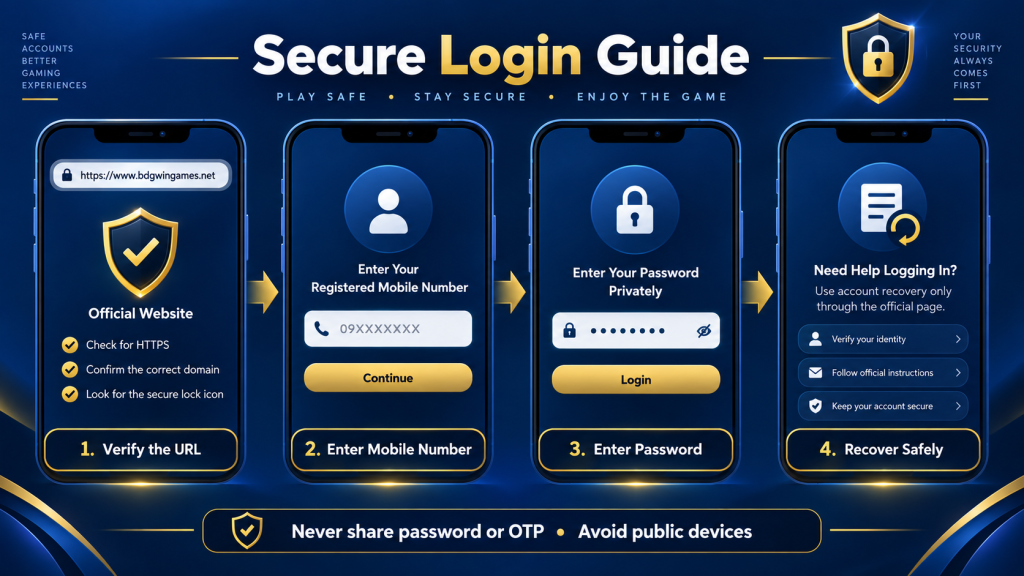
Four-step secure BDG Win login guide for mobile users
Secure login steps: verify the URL, enter your registered number and password, and recover access only through the official page.

How to Register on BDG Win: Account Setup Guide

How to Register on BDG Win

Before creating an account, check age, location, identity and payment requirements. Registration should be a considered decision—not a reaction to a bonus countdown.

Open Registration Page

Before you start

  • You must be at least 18 and legally eligible in your location.
  • Read current Terms, Privacy Policy, bonus conditions and withdrawal rules.
  • Use a phone number you control and a unique password.
  • Decide a loss limit before depositing money.

Typical registration steps

  1. Open the external page and choose Register.
  2. Enter an eligible mobile number.
  3. Create and confirm a strong password.
  4. Review any invitation code displayed or prefilled.
  5. Read the privacy agreement and terms before accepting.
  6. Complete phone verification if requested.
  7. Review account and security settings before depositing.

Invitation codes and bonuses

An invitation code may identify the referrer. A signup bonus can have deposit, wagering, game, time or withdrawal conditions. Save a copy of the current offer terms; do not assume a headline amount is withdrawable cash. See the gift code and bonus guide.

Identity checks

The operator may request information to verify age, identity or payment ownership. Submit documents only inside a verified operator flow. Avoid sending KYC files to individuals through messaging apps.

After registration

Secure the account, learn the deposit process, review the withdrawal requirements and read our Responsible Gaming policy.

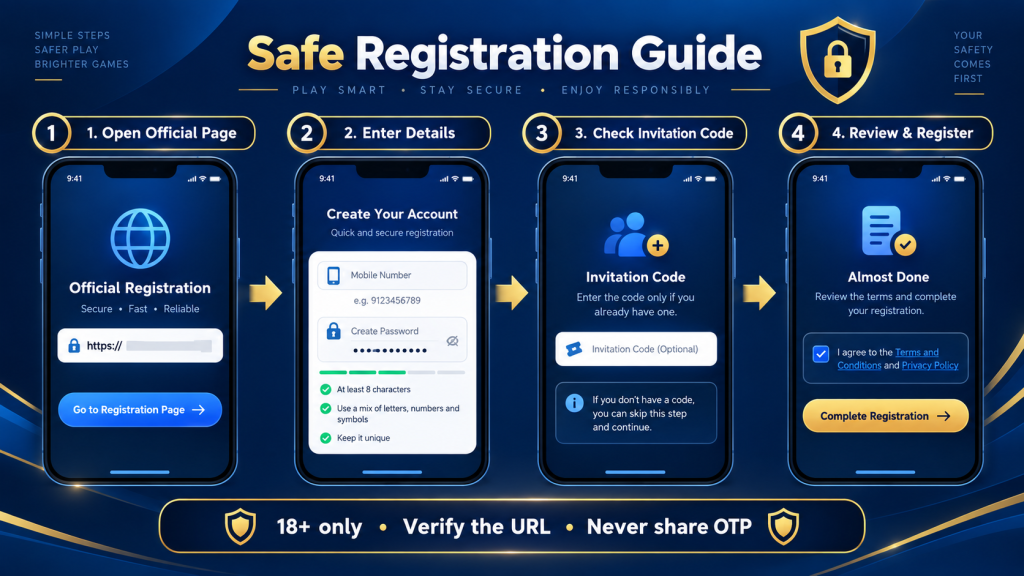
Four-step safe BDG Win registration guide for mobile users
Safe registration steps: verify the official page, enter your details, check any invitation code and review before registering.

BDG Win Deposit Guide: Limits, Records and Safety

BDG Win Deposit Guide

A deposit is a real financial transaction. Confirm the recipient, current limits and account ownership before sending money.

Before depositing

  • Log in through a verified route, not an unknown chat link.
  • Check minimum and maximum amounts shown inside the account.
  • Understand bonus wagering and withdrawal conditions.
  • Set a firm entertainment budget.
  • Never borrow or use essential funds.

Typical deposit process

  1. Open the Wallet or Deposit area after logging in.
  2. Select a payment method displayed by the operator.
  3. Enter an amount within the current limits.
  4. Verify the payee or UPI details shown in the live flow.
  5. Complete payment once; avoid duplicate retries.
  6. Save the transaction reference and confirmation screen.

If a deposit is pending

Do not immediately pay again. Check your bank statement and account wallet, note the transaction ID, amount and time, and contact the operator through its verified support channel. Share only the minimum evidence required and hide unrelated financial information.

Common red flags

Stop if someone asks you to send funds to a different personal account, install screen-sharing software, disclose a UPI PIN, or pay an additional “unlock fee.” A UPI PIN is entered only in your payment app and should never be revealed.

Next, understand withdrawal checks and responsible limits. Return to the BDG Win guide.

BDG Win Withdrawal Guide: Requirements and Troubleshooting

BDG Win Withdrawal Guide

Withdrawal rules can change. Check the live account for the current minimum, identity requirements, payment details and processing status.

Before requesting a withdrawal

  • Confirm your name and payment details are accurate.
  • Complete legitimate in-account verification if required.
  • Check current minimum/maximum limits and daily request rules.
  • Review whether a bonus has wagering conditions.
  • Do not pay an individual to “release” winnings.

Typical withdrawal steps

  1. Log in and open Wallet or Withdraw.
  2. Add or select a payment account owned by you.
  3. Enter an amount allowed by the current rules.
  4. Review the details and submit once.
  5. Save the request ID and status screen.
  6. Check the destination account after the stated processing period.

Why a request may be delayed

Common causes can include incorrect bank or UPI details, incomplete verification, a pending deposit, turnover conditions, request limits, maintenance or manual review. Only the operator can confirm the actual reason for a specific account.

Safe troubleshooting

Record the account username (not password), request ID, amount, time and visible status. Contact verified in-account support. Never provide an OTP, password, PIN or remote access. Avoid anyone promising guaranteed recovery for an advance fee.

Read the related deposit guide, account security guide and site disclaimer.

BDG Win Games Explained: Lottery, Slots, Casino and Sports

BDG Win Games Explained

Game availability changes, but users commonly encounter lottery-style prediction games, slots, casino products and sports-related markets. Each category involves risk.

Lottery and prediction-style games

These games typically ask users to choose an outcome for a timed round. Short rounds can encourage rapid repeat decisions. Previous colours, numbers or patterns do not prove what the next result will be.

Slots

Slot outcomes are chance-based. Pay tables, volatility and maximum awards can differ by title. A large advertised prize does not represent the usual result.

Casino games

Casino categories may include table, card or live-dealer formats. Understand the rules and house advantage before staking money. A strategy can change how a game is played but does not remove uncertainty or guarantee profit.

Sports-related options

Sports outcomes remain uncertain even when a user follows a team closely. Check settlement rules, market definitions and void conditions before participating.

How to compare games responsibly

  • Read the rules and payout table.
  • Check minimum stake and round speed.
  • Avoid games you do not understand.
  • Set both money and time limits.
  • Do not chase a previous loss or follow paid “fixed” predictions.

For account access, use the login guide. Before adding funds, read the deposit guide and Responsible Gaming page.

BDG Win Gift Code and Bonus Guide: How to Verify Offers

BDG Win Gift Code and Bonus Guide

Promotions can expire or carry important conditions. This guide explains how to verify a code without publishing an unconfirmed “daily” code.

Where to verify a current offer

  1. Log in through a trusted access route.
  2. Open the Promotion, Bonus, Gift or Activity area.
  3. Check eligibility, start/end time and participating games.
  4. Read deposit, wagering and withdrawal conditions.
  5. Save the terms before claiming.

Common conditions

A bonus may require a first deposit, minimum payment, invitation code, eligible game, total wagering amount or claim within a limited time. Some bonus balance may not be directly withdrawable.

Avoid fake codes

Be cautious with videos or messages promising a guaranteed working code, unlimited balance or a paid unlock. Never share an OTP or password to receive a gift. A legitimate code should be entered only in the operator’s own promotion field.

Why a code may not work

  • It expired or reached a claim limit.
  • Your account or location is not eligible.
  • A required deposit or activity is incomplete.
  • The code was copied incorrectly.
  • The offer applies only to new or selected users.

Review the registration guide, affiliate disclosure and responsible-gaming information.

BDG Win App Safety Checklist Before Installing an APK

BDG Win App Safety Checklist

An APK installed outside Google Play deserves extra care. Use this checklist before downloading, installing or updating the app.

Source checks

  • Open the download page from a trusted bookmark.
  • Confirm HTTPS and the expected destination.
  • Avoid shortened, forwarded or mirror links.
  • Do not install a file that arrives unexpectedly.

File and device checks

  • Keep Android and Play Protect updated.
  • Review the file name, version and publisher information.
  • Scan the file with device security tools.
  • Keep a backup of important device data.
  • Disable unknown-app installation after use.

Permission checks

Ask why the app needs each permission. Contacts, SMS, call logs, accessibility services, device administration, microphone, precise location and unrestricted media access can expose sensitive data. Deny permissions that are not necessary for the feature you are using.

Account and payment protection

Use a unique password, lock your screen, do not save a payment PIN in notes, and never let another person control your screen. Type an OTP only into the verified operator flow that triggered it.

Warning signs after installation

Uninstall and scan your device if the app shows unrelated ads over other apps, requests accessibility control without a clear need, sends messages without permission, drains battery abnormally or redirects to unknown payment pages.

See the full BDG Win download guide, login guide and privacy policy.

BDG Win Account Security and Responsible Play Guide

BDG Win Account Security and Responsible Play

Security protects your account; limits protect your finances. Both should be set before you participate.

Protect the account

  • Use a unique password of sufficient length.
  • Keep the registered phone and recovery method secure.
  • Never disclose an OTP, password or payment PIN.
  • Sign out of shared devices and avoid public Wi-Fi for payments.
  • Check account history for unfamiliar activity.

Recognize impersonation

Scammers may claim to be support, prediction experts or withdrawal agents. Warning signs include requests for remote access, advance fees, personal UPI transfers, secret codes or moving the conversation to an unverified account.

Set money and time boundaries

Choose a fixed entertainment amount and session length. A limit must remain in place after a loss. Do not increase the next stake to recover previous money, and never treat a lucky result as predictable income.

When to stop

Stop and use cooling-off or self-exclusion controls if you feel unable to follow your limit, hide activity from family, borrow, miss responsibilities or experience stress about losses. Removing the app and blocking payments can create useful distance.

If you suspect account misuse

  1. Stop deposits and change the password through the verified service.
  2. Secure your email, phone and payment apps.
  3. Record suspicious transactions and contact the relevant payment provider.
  4. Use verified platform support; do not hire an unknown “recovery” agent.

Read the dedicated Responsible Gaming page, login guide and withdrawal guide.